
A DataGalaxy Catalog integration can be configured to synchronize dictionaries, usages, data products, and other defined workspace elements with DataGalaxy Portfolio instances.
It is possible to do so via Admin settings > Integration.
Initialisation on DataGalaxy Portfolio
-
In Admin settings > Integration, create a new Integration and give it a name, for example “DataGalaxy Catalog Integration”.
-
Generate an API Token and copy the value. Unless there is a very specific need, the DataGalaxy Catalog connector token must be chosen preferentially with no expiration date.
The token will never be accessible again, so copy the value in a secure place
-
Give to DataGalaxy Portfolio team the API token.
-
DataGalaxy Portfolio needs to re-deploy your app with this information and add a feature-flag.
-
Create or have these concepts on DataGalaxy Portfolio :
-
(mandatory) A concept representing the DataGalaxy instance you want to map, which must have an
External keyfield.
-
Only one DataGalaxy Catalog connector is possible per platform.
Initialisation on DataGalaxy Catalog
The integration requires a DataGalaxy Catalog token. Instructions for creating the token are available in this documentation.
Instances synchronization behaviour
Creation
DataGalaxy Catalog → DataGalaxy Portfolio
-
Trigger : Every X minutes.
-
Actions : Creates the DataGalaxy Portfolio instance based on mapping and populates the fields mapped in the connector configuration.
DataGalaxy Portfolio → DataGalaxy Catalog
-
Trigger : DataGalaxy Portfolio instance is in a concept mapped with a DataGalaxy Catalog objet with a configuration that is non-flat and has:
-
A name
-
A technical name
-
Embedded-by or association n-1 field (if applicable)
-
If this field is filled, the instance is considered embedded under its parent.
-
If not filled, the instance can be considered a first-class object (top-level).
-
-
A type (as an association n-1 with DataGalaxy Catalog field :
EntityType), only for dictionary types (containers, structure,…) and multiple DataGalaxy Catalog concepts synchronized to a single DataGalaxy Portfolio concept
-
If any of those above isn’t set, the instance will not be created in DataGalaxy Catalog.
-
Actions : Creates the DataGalaxy Catalog instance and populates the attributes mapped in the connector configuration.
Update
DataGalaxy Catalog → DataGalaxy Portfolio
-
Trigger : Every X minutes (see polling).
-
Actions : Updates the DataGalaxy Portfolio instance based on mapping and populates the fields mapped in the connector configuration.
DataGalaxy Portfolio → DataGalaxy Catalog
-
Trigger : Every update on a mapped field in DataGalaxy Portfolio.
-
Actions : Updates the DataGalaxy Catalog instance based on mapping and populates the attributes mapped in the connector configuration.
Not all attributes are editable on DataGalaxy Catalog. See details here.
Deletion
DataGalaxy Catalog → DataGalaxy Portfolio
Behavior
-
Nothing happens; the instance will no longer be synchronized.
DataGalaxy Portfolio → DataGalaxy Catalog
-
Trigger : Every deletion on a mapped instance in DataGalaxy Portfolio.
-
Actions :
-
If
makeObsoleteInsteadOfDeletingis set totrue(default option), the corresponding DataGalaxy Catalog instance status is set to Obsolete (instance is not removed). -
If
makeObsoleteInsteadOfDeletingis set tofalse, the corresponding DataGalaxy Catalog instance is deleted from DataGalaxy Catalog.
-
Connector restart
The connector restarts when the DataGalaxy Portfolio app restarts or the JSON configuration is changed.
On connector restart, we re-fetch all DataGalaxy Catalog instances that are in mapped projects.
Configuration
JSON Configuration
You need to create a JSON as below, more information on the JSON structure is available below :
{
  "apiUrl": "https://url.api.datagalaxy.com",
  "credentials": {
    "token": "myIntegrationTokenOrPersonalToken"
  },
  "polling": {
     "cron": "0 23 * * *", //Synchronization done every day at 23:00
     "timezone": "Europe/Paris",
     "forceSyncOnConfigurationUpdate": true
  },
  "configuration": {
    "notObsoleteContainer": {
      "name": "Container",
      "type": "flat-dictionary",
      "workspace": "workspaceId",
      "workspaceVersionId": "workspaceVersionId",
      "dataType": "containers",
      "containers" : {
        "filters": [ //All filters will be applied as an AND filters
          {
            "attribute": "EntityStatus",
            "condition": "NOT_EQUALS", // EQUALS, NOT_EQUALS, IS_NOT_EMPTY or IS_EMPTY
            "value": "Obsolete"
          },
          {
            "attribute": "Stewards", // Multi-value relation attribute
            "condition": "CONTAIN", // CONTAIN, CONTAIN_SOME, DO_NOT_CONTAIN, EQUALS, NOT_EQUALS, IS_NOT_EMPTY or IS_EMPTY
            "value": ["admin@datagalaxy.com"]
          }
        ],
        "linkFilters": [
          {
            "attribute": "IsOutputPortFor",
            "condition": "IS_NOT_EMPTY"
          },
          {
            "attribute": "IsInputOf",
            "condition": "CONTAIN",
            "value": ["81d51f02-c0f1-4460-a2b0-4672d1177ff4:81d51f02-c0f1-4460-a2b0-4672d1177ff4"]
          }
        ],
        "attributes": [ //Optional, if no configuration is mapped all attributes will be added to the mapping. As DataGalaxy Catalog has a lot of attributes, it is recomended to filter them.
          {
            "key": "DisplayName",
            "label": "Name", //Optional, if empty the Attribute name will be used
            "mode": "sync" //sync/read/write,
          },
          {
            "key": "TechnicalName",
            "label": "Technical Name",
            "mode": "write"
          }
        ]
      },
    "notObsoleteReport": {
      "name": "Report",
      "type": "usages",
      "workspace": "workspaceId",
      "usages" : {
        "attributes": [ //Optional, if no configuration is mapped all attributes will be added to the mapping. As DataGalaxy Catalog has a lot of field, it is recommended to filter them.
          {
            "key": "DisplayName",
            "label": "Name", //Optional, if empty the Attribute name will be used
            "mode": "sync" //sync/read/write,
          },
          {
            "key": "TechnicalName",
            "label": "Technical Name",
            "mode": "read"
          }
        ]
      }
    }
  }
}
API URL
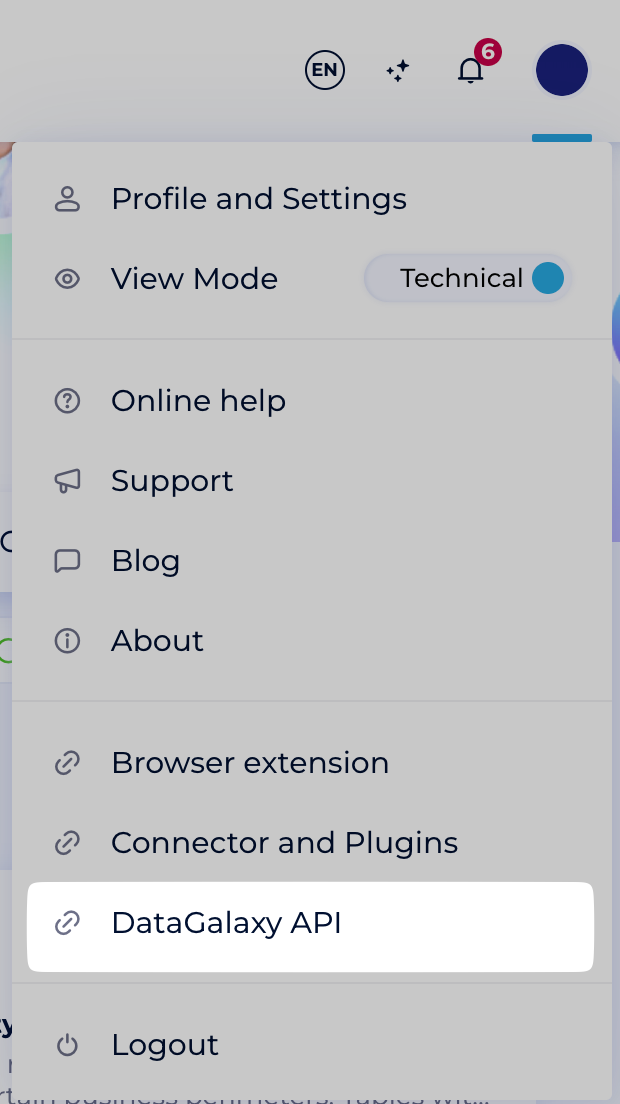
To retrieve the DataGalaxy Catalog API URL, follow these steps:
-
Go to your company's DataGalaxy Catalog platform.
-
Click on your profile in the top right corner.
-
Select DataGalaxy API.
-
Copy the provided URL.
Polling
The polling configuration take three options:
-
cron: A cron-like string that defines when polling is done.-
Use a website like crontab.guru to help create the configuration
-
-
timezone(optional):-
If not specified,
UTCwill be used by default. -
Valid timezones are:
-
-
forceSyncOnConfigurationUpdate(optional):-
If empty or set to
true, synchronization occurs each time the configuration is updated. -
If set to
false, synchronization will only happen according to the cron schedule.
-
Workspace Id
To find out the workspaceId:
-
Go to your company's DataGalaxy Catalog platform.
-
Navigate to the workspace you need the ID for.
-
Check the URL in your browser:
-
The
workspaceIdis the UUID that appears right afterspace/in the URL. -
For example, if the URL is:
https://dkw.datagalaxy.com/#/client/ccd4ddc5-2236-4df2-b028-c7041a48e5ef/space/17eefa1c-9ca2-4083-b4ae-d5c7a7ebd094/49fc80fa-6837-4791-9768-e4771a973bb8/homethen the
workspaceIdis17eefa1c-9ca2-4083-b4ae-d5c7a7ebd094.
-
Workspace Version Id
This option workspaceVersionId allows you to choose which version of the workspace to use. This option is not mandatory. If not specified, the default workspace defined in DataGalaxy Catalog will be used.
Version ID can be found using the query
https://api.datagalaxy.com/v2/documentation#tag/Workspaces/operation/GetVersions
Links
If getLinks is set to true (optional, false by default) an association will be added.
An n-n association corresponding to the links in the instance will be added to the mapping.
Only links for which the target type appears once in the configuration will be included.
The linkModeoption (optional, ‘sync’ by default) allows you to choose how these associations will be synchronized :
-
sync: association value will be synchronized between DataGalaxy Portfolio and DataGalaxy Catalog, meaning that both DataGalaxy Portfolio → DataGalaxy Catalog and DataGalaxy Catalog → DataGalaxy Portfolio will be handled -
write: (DataGalaxy Catalog → DataGalaxy Portfolio) only updates from DataGalaxy will be considered for this association -
read: (DataGalaxy Portfolio → DataGalaxy Catalog) only updates from DataGalaxy Portfolio will be considered for this association
Configuration type
Two types of configurations are supported: flat and non-flat.
Flat Configuration
-
Description:
Used when the tree (parent/child representation) of DataGalaxy Catalog is not synchronized with DataGalaxy Portfolio. Instances are synchronized independently, without representing their position in the DataGalaxy Catalog hierarchy. -
Filters:
Supported to determine which DataGalaxy Catalog instances should be synchronized. -
Limitations:
Creation from DataGalaxy Portfolio → DataGalaxy Catalog is not supported because DataGalaxy Catalog requires a tree representation.
Non-Flat Configuration
-
Description:
Used when the tree structure is synchronized and mandatory in DataGalaxy Portfolio. The tree is represented by an embedding or an association n-1 field on the parent, which must be mapped in DataGalaxy Portfolio to the corresponding field.-
If this field is not mapped, no children of the given parent will be synchronized.
-
-
Example:
To synchronize Use Cases (children) with their Initiatives (parents), both objects must be declared in the JSON configuration. Since the connector recognizes that Use Cases can be embedded within Initiatives, an embedding field will automatically be proposed in the Initiatives mapping. -
Filters:
Not supported. -
Scope:
All parents and children must belong to the same workspace.
Data Types
-
The
dataTypeis required when applicable. -
It corresponds to
EntityTypein DG -
It tells the connector which type of instances will be synchronized.
-
In some types (usages), the type is implied, so you don’t need to specify
dataType.
|
Flat |
Non-flat |
|
|---|---|---|
|
|
|
|
|
|
|
To enable creation, the |
|
|
|
|
|
|
|
|
|
|
|
|
|
|
|
|
|
|
|
DataProcessing Items (DPI) are not available and will not be synchronised |
For dictionary, below are the dataType:
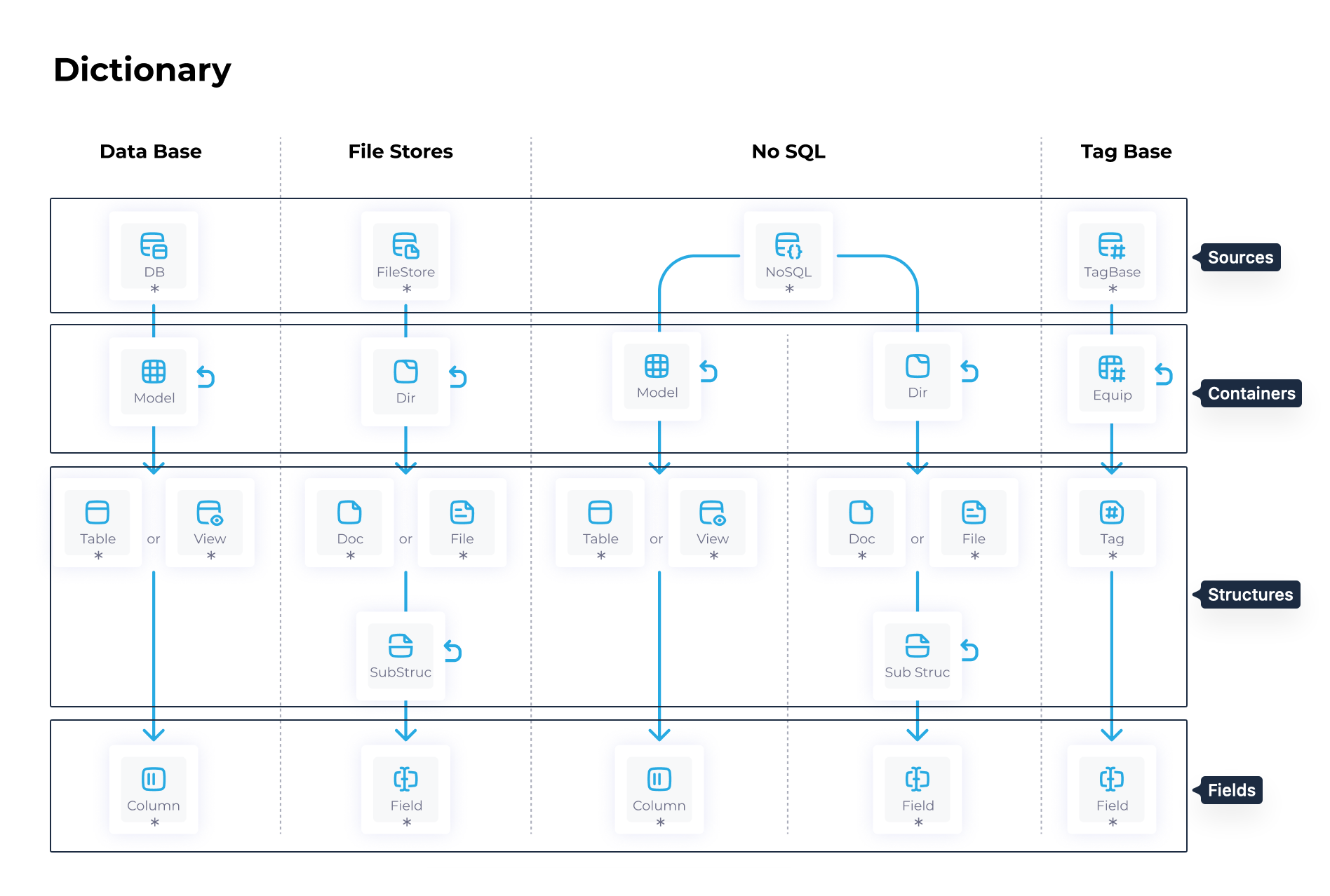
The configuration is declared with the followed model:
{
  "configurationKey": {
  "name": "Container",
  "type": "flat-dictionary",
  "workspace": "workspaceId",
  "dataType": "containers",
  "parentYOOIType": "association"// "association" or "embedding" ("embedding" per default)
  "makeObsoleteInsteadOfDeleting": false, //true per default
  "getLinks": true, // false per default
  "linkMode": 'sync', // 'sync', 'write' or 'read'
  "{name of the dataType}" : {
    "filters": [], // only applicable if type is flat
    "linkFilters": [], // only applicable if type is flat and getLinks is true
    "attributes": []
  }
}
The configurationKey needs to be unique for each configuration, as it is used internally as an id for the configuration. The name is the actual display name used in the mapping.
The filters (only supported if flat) and attributes properties are described in the next sections.
The parentYOOIType option, whose value can be "association" or "embedding", allows you to define whether the parent is of the embedding or association type in DataGalaxy Portfolio. By default, the type used is embedding.
Filters and linkFilters
Only supported in flat configuration.
DataGalaxy Catalog instance count tend to be high, and you probably don’t want to add all of them to your DataGalaxy Portfolio instance. To avoid that, the configuration allows you to define a list of filters to apply to each of your configurations :
-
filtersallows you to specify filters related to object attributes. -
linkFiltersallows you to specify filters related to links between objects. This option is only available if links are enabled (the value ofgetLinksistrue).
Filters take three parameters:
-
attribute: the attribute or link key you want to filter on -
condition:-
either
EQUALS,NOT_EQUALS,IS_EMPTY, orIS_NOT_EMPTYfor most attributes, -
or
EQUALS,NOT_EQUALS,CONTAIN,CONTAIN_SOME,DO_NOT_CONTAIN,IS_EMPTYorIS_NOT_EMPTYfor multi-value relation attributes (ManagedTag,MultiValueList,UserReference, andStewardUserReference) and filters on links.
-
-
value: the value to be tested (array of values for multiple value relations attributes, number for number attributes, etc.). ForlinkFilters, the ID of the DataGalaxy Catalog objects must be used (VersionId:ObjectId).
All the filters on the list will be applied as an AND filters.
Instances that have already been synchronised will still be updated even if they no longer match the filter. To prevent synchronisation, key must be removed from the DataGalaxy Portfolio instance.
Attributes
The configuration can be enriched with an optional list of attributes to synchronized.
-
key: this is the attribute key of DataGalaxy Catalog, to get it you need to make an API call to GetAttributes endpoint -
label: optional, only used to generate mapping label, if empty the attribute label will be used -
mode: optional, default value issyncif attribute is editable on DataGalaxy Catalog,readif not.-
sync: attribute value will be synchronized between DataGalaxy Portfolio and DataGalaxy Catalog, meaning that both DataGalaxy Portfolio → DataGalaxy Catalog and DataGalaxy Catalog → DataGalaxy Portfolio will be handled -
write: (DataGalaxy Catalog → DataGalaxy Portfolio) only updates from DataGalaxy will be considered for this attribute -
read: (DataGalaxy Portfolio → DataGalaxy Catalog) only updates from DataGalaxy Portfolio will be considered for this attribute
-
If no attributes list is configured, all DataGalaxy Catalog attributes will be displayed in the mapping section. As there is a lot of attribute in an DataGalaxy Catalog workspace, it is encouraged to configure an attribute list in order to make the mapping more readable, and the connector more efficient.
For non-flat configurations, embedding fields will automatically be added for mapping on the parent concepts.
Mapping
DataGalaxy Catalog dictionaries and usages can be mapped to DataGalaxy Portfolio instances.
To display the mapping section for the first time, a valid JSON configuration is required.
Supported field types
Currently, the following field types can be mapped:
-
Text -
EntityLogicalPathString -
Boolean -
Number -
ValueList -
SystemEntityType -
ManagedTag -
UserReference -
StewardUserReference -
MultiValueList -
HtmlLink -
FormattedText -
Embeddingfield when applicable
Single relation mapping
For single-value relation attributes (such as ValueList and SystemEntityType), two types of mappings can be defined: one for mapping the value to an n-1 relation field, and another for mapping it within a workflow. You should choose only one of these mappings and disregard the other. Mapping both is not recommended, as it can lead to unpredictable behavior when syncing from DataGalaxy Portfolio to DataGalaxy Catalog.
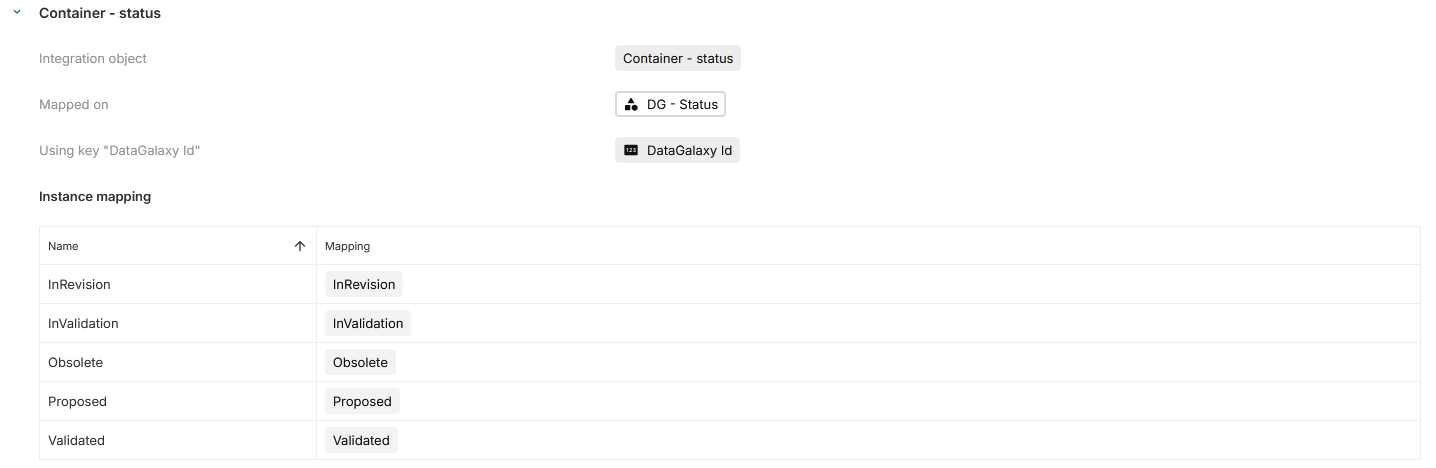
Association field mapping
For each configured association field, the connector creates a mapping section to match instances. This matching process ensures that each DataGalaxy Catalog instance corresponds to the correct instance in DataGalaxy Portfolio.
The primary tool for this mapping is the externalKey field.
The table serves two purposes:
-
A visual aid to see which instance is mapped to which value.
-
An edition tool, as linking an instance in the table (selecting a DataGalaxy Portfolio instance) will edit the key field with the correct value.
If the keys are already filled in DataGalaxy Portfolio, the mapping happens automatically.
Editable attributes in DataGalaxy Catalog
Not all attributes can be updated in DataGalaxy Catalog.
Below is a list of attributes that can be modified depending on the data type. Other attributes will be ignored when doing an update from DataGalaxy Portfolio to DataGalaxy Catalog, even if there are set to sync or read.
TechnicalName needs to be unique per dataType in DataGalaxy Catalog.
For Stewards and Owners, only specific users are allowed to hold these roles in DataGalaxy Catalog. If a user assigned from DataGalaxy Portfolio is not eligible, the update will be rejected.
|
|
Editable attributes |
Comments |
|---|---|---|
|
Sources |
|
|
|
Fields |
|
|
|
Objectives, Initiatives, Data Products, AI Products, Policies, Rules, Monitors, Containers, Structures, DataProcessing, Glossary |
|
|
|
Usages |
|
|